Fieldprint API – Fieldprint Analysis Report Options
Access to the Fieldprint Platform and API requires Field to Market membership and an active Data Management Licensing Agreement. Learn more about membership and our data partner program to get started.
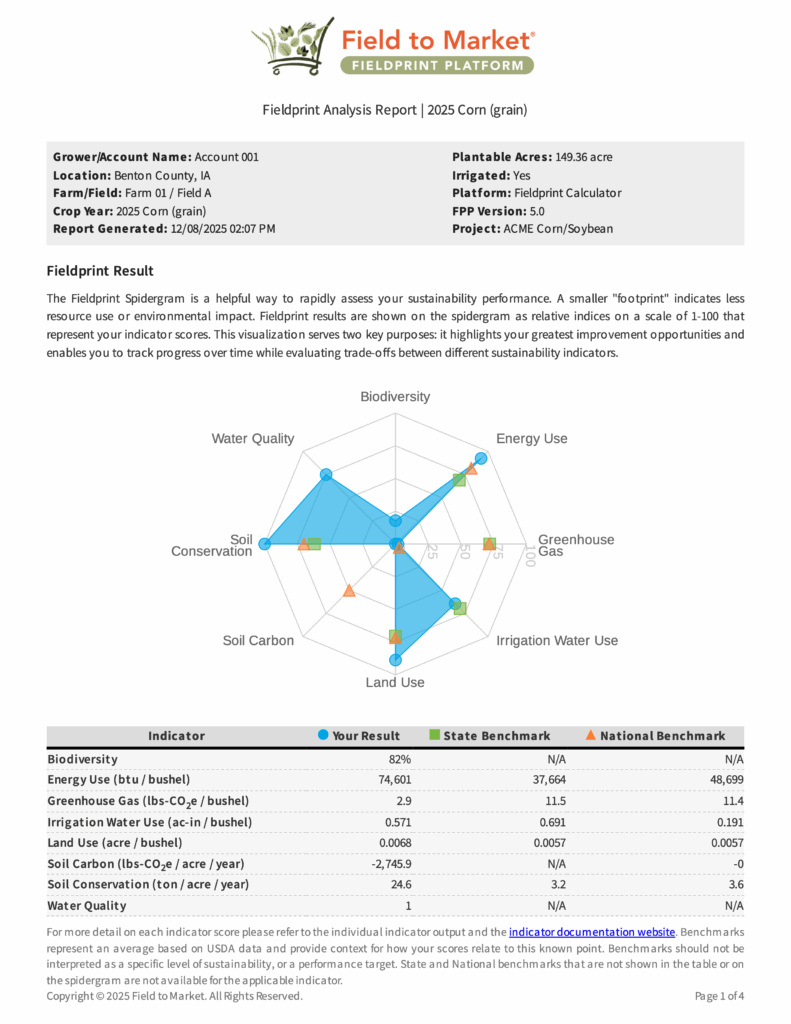
The /v5/Calculator endpoint can generate a Fieldprint Analysis — a PDF report summarizing a field’s sustainability metric results for the analysis year (the most recent crop year in the payload). When report generation is enabled, the API response includes a report_url linking to the PDF. This page documents the request parameters that control report generation and how each value maps to the report header.
Access to the Fieldprint Platform and API requires Field to Market membership and an active Data Management Licensing Agreement. Learn more about membership and our data partner program to get started.
How It Works
Report generation is off by default. To generate a Fieldprint Analysis PDF, set options.report.generate to true in your /v5/Calculator request. The API will compute all metrics as usual and additionally produce a PDF report for the analysis year. The response metadata will include a report_url field containing a direct link to the generated PDF.
The report header displays identifying information about the field, grower, and data source. These values are drawn from several parameters spread across the options and field objects in your request. The table below details each parameter, where it appears in the request, and how it maps to the report.
Report Parameters
The following parameters control report generation. Parameters marked Required for report must be provided when options.report.generate is true.
| JSON Path | Type | Report Role | Description |
|---|---|---|---|
options.report.generate |
boolean | Required for report | Set to true to generate the Fieldprint Analysis PDF. When false or omitted, no report is generated and no report_url is returned in the response. |
options.report.generated_for |
string | Required for report | Appears on the report header as the organization or account name that collected the data. Typically the QDMP name or grower account identifier. Limited to 40 characters. |
options.report.grower |
string | Required for report | Appears on the report header as the farm or grower name. Limited to 40 characters. |
field.field_name |
string | Required for report | The field name that appears on the report header. This is a field-level parameter, not nested under options. |
field.location |
string | Recommended | Location text displayed on the report header, typically county and state (e.g., "Benton County, IA"). If omitted, the report defaults to the state derived from the field geometry. Limited to 40 characters. |
options.project_name |
string | Optional | Project name displayed on the report. If omitted, the report displays “Not Specified.” Limited to 40 characters. |
options.data_status |
string | Optional | Controls the “Data Status” line on the report header. To display a project label instead, prefix the value with Project: (e.g., "Project: ACME Corn/Soybean"). Without the prefix, the value is shown as the Data Status text. |
Report Header Mapping
The table below shows how each request parameter maps to a specific line in the report header. This can help when debugging why a report field is blank or showing an unexpected value.
| Report Header Line | Source Parameter | Example Value |
|---|---|---|
| Generated For | options.report.generated_for |
Account 001 |
| Grower / Farm | options.report.grower |
Farm 01 |
| Field | field.field_name |
Field A |
| Location | field.location |
Benton County, IA |
| Project | options.project_name |
FTM Demo Project |
| Data Status / Project | options.data_status |
Project: ACME Corn/Soybean |
Example Request Snippet
The following snippet shows the report-related parameters within a /v5/Calculator request. Only the options and field header fields are shown — the full request would also include field.geometry, crop_intervals, and other required data.
{
  "options": {
    "report": {
      "grower": "Farm 01",
      "generated_for": "Account 001",
      "generate": true
    },
    "data_status": "Project: ACME Corn/Soybean",
    "project_name": "FTM Demo Project"
  },
  "field": {
    "field_name": "Field A",
    "location": "Benton County, IA",
    "state": "IA",
    "county": "Benton County",
    "geometry": {
      "type": "Polygon",
      "coordinates": [ /* ... */ ]
    }
  },
  "crop_intervals": [ /* ... full crop history ... */ ]
}
Report URL in the Response
When options.report.generate is true and the calculation succeeds, the response metadata includes a report_url field:
// Excerpt from /v5/Calculator response metadata
{
  "metadata": {
    "runTimeSec": 45,
    "generated_for": "Account 001",
    "grower": "Farm 01",
    "field": "Field A",
    "location": "Benton County, IA",
    "report_url": "https://api.fieldtomarket.org/v5/reports/Fieldprint_Analysis_2026-04-04_932bf9cf-9461-4750-a457-0c9ef1fe06e4.pdf",
    // ... additional metadata fields ...
  },
  "cropyears": [ /* ... metric results ... */ ]
}
https://api.fieldtomarket.org/v5/reports/Fieldprint_Analysis_{date}_{guid}.pdf where {date} is the calculation date and {guid} is a unique identifier. This URL is accessible without authentication but expires after 24 hours.
Usage Notes
crop_intervals array. If your payload includes intervals from 2008 through 2025, the report will cover the 2025 crop year and its associated metrics.
generated_for, grower, location, project_name) are each limited to approximately 40 characters including spaces. Longer values may be truncated on the PDF.
options.data_status field has a special behavior — if the value begins with Project: (followed by a space), the report header will display the text as a project label. Without this prefix, the text appears as a plain data status value. This provides flexibility for QDMPs that organize data differently.
options.report.generate: true to generate a new one.
validate_only: true is set (since no calculation runs) and may produce incomplete results when options.skip_models: true is set (since Soil Conservation and Soil Carbon will show zero values). For accurate reports, submit a full calculation without these flags.
Reach out to support@fieldtomarket.org with additional questions on implementation.
Example Fieldprint Analysis Report based on options in /Calculator Request snippet above.