Fieldprint Project Annual Reporting
Field to Market’s Project Framework harnesses the power of collaboration and locally-led conservation solutions to deliver sustainable outcomes for agriculture, people, and the planet.
The hallmark of Field to Market’s Project Framework lies in a process-based approach to advancing continuous improvement, delivering solutions to global sustainable development priorities while also addressing local natural resource concerns. These Projects utilize the power of voluntary, and often market-driven, solutions to incentivize improved environmental outcomes and enhance farmer livelihoods.
A Fieldprint Project must annually track and report progress against stated objective(s) and any related adaptive management publicly and to Field to Market staff. All Fieldprint Projects are expected to make progress toward their stated objective(s) over time.
Annual Reports for all active Fieldprint Projects are required to be submitted through Field to Market’s online reporting system during the reporting period – January to April 30 for the previous year’s growing season. Please ensure all Fieldprint Platform data is entered into the calculator and finalized before starting the Annual Report Process. Only calculated and finalized data is included in reporting.
This step-by-step guide will assist project administrators through the Annual Reporting Process for each Fieldprint Project.
General Information
Project administrators must file a report for the previous year’s growing season for each active project, providing information on:
- The number of new growers enrolled in the most recent crop year;
- The number of growers enrolled in the most recent crop year that were also enrolled in the preceding year (retained growers);
- The number of entered (acres reported by the farmer in the Fieldprint Platform or other QDMP) and enrolled (acres managed by farmer for a particular crop) acres. Note Projects must require each grower to enter data for a minimum of 10% of their acres into the Fieldprint Platform or QDMP in order to be enrolled in the project for a specific crop. Acres are not required for Incubation projects;
- Progress against project objectives;
- If the project intends to allocate acres and growers to multiple entities in the supply chain, please note appropriate allocation amounts for this year to avoid double counting. This applies for cases in which multiple Project Leads or Partners and/or licensees have agreed to share acres and growers within a project. Note licensing fees may apply; and
- Whether the project location is accurately mapped (including county and watershed level mapping when provided).
Access Member Portal and Start Registration
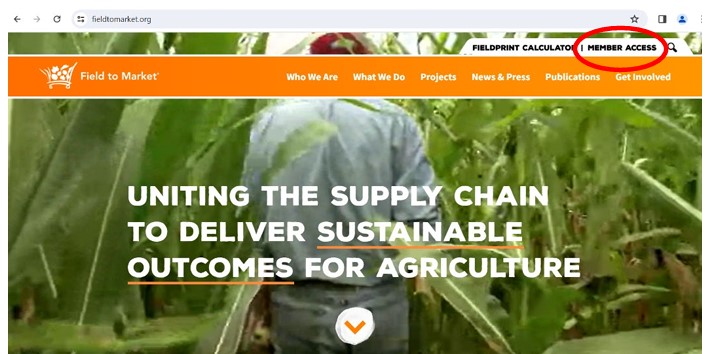
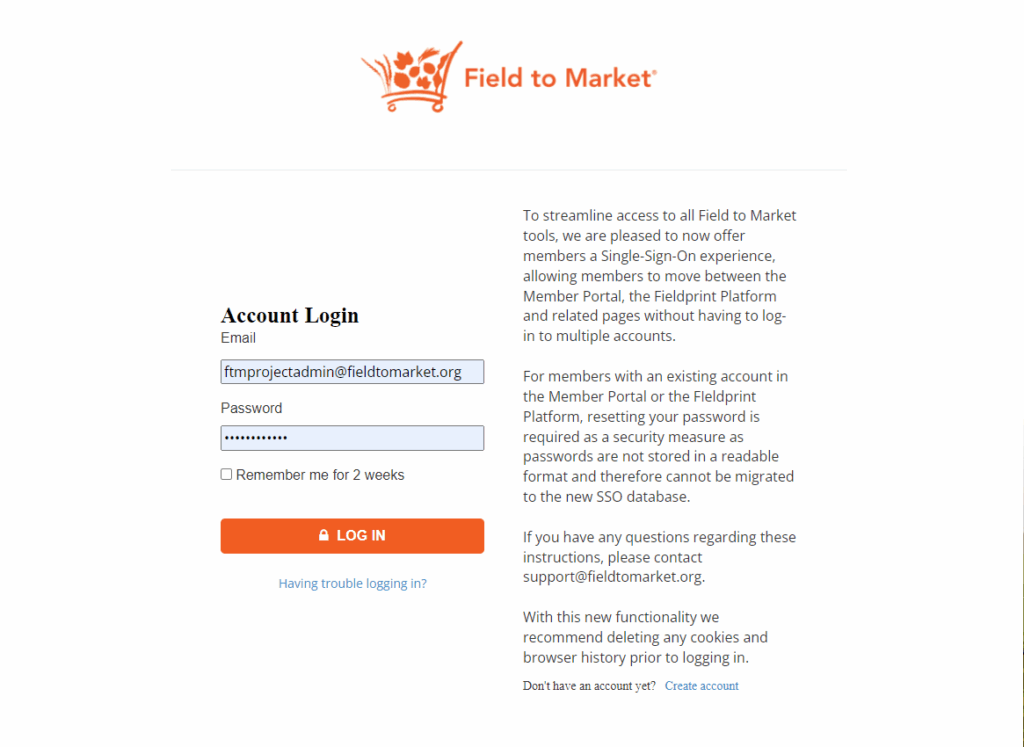
To begin, log into your Field to Market member account with your email address and password. If you have trouble logging in, please follow the prompts or reach out to support@fieldtomarket.org.
Step 1: Navigate to Your Fieldprint Project
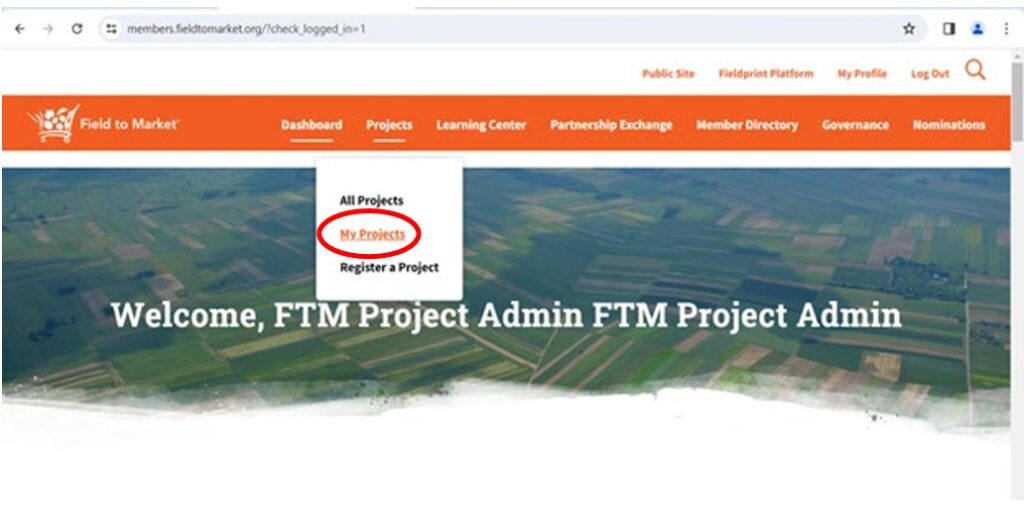
- Select My Projects from the Project tab in the Member Portal.
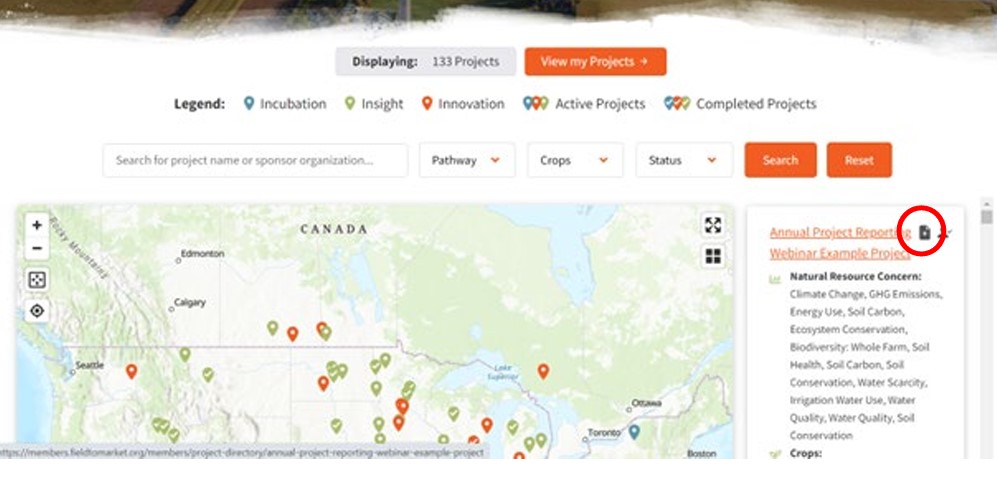
- Open the Project and click the Submit Annual Report button or select the Annual Report button for your project in the ‘My Projects’ page.
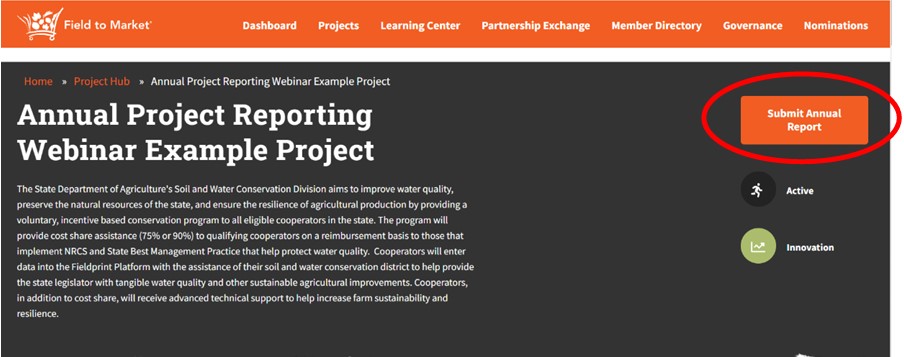
Step 2: Complete Your Annual Report
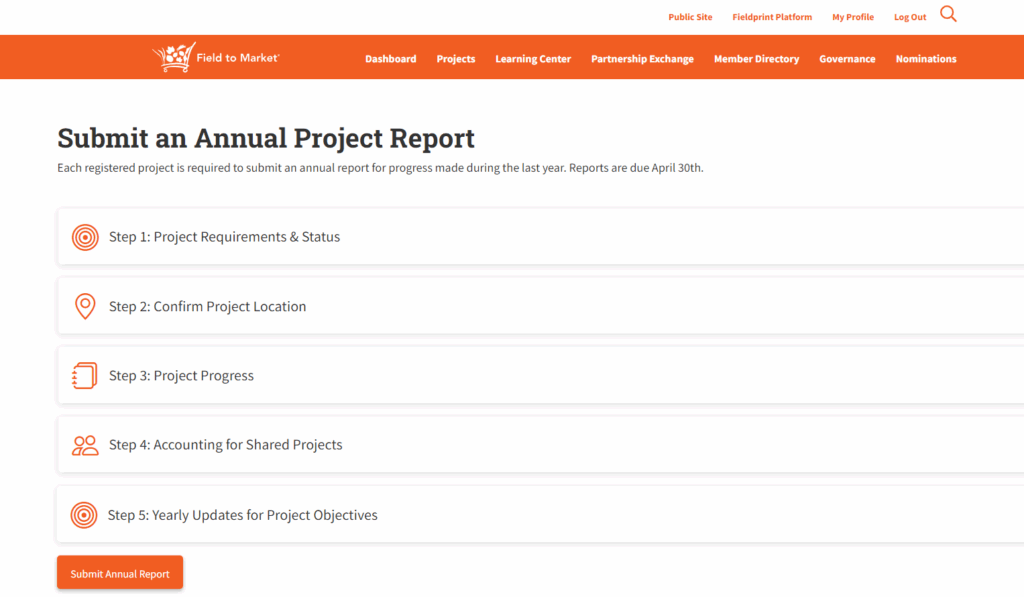
- Complete each of the five sections of the Annual Report. Note that you are unable to save your progress; you must complete the submission once you start the process.
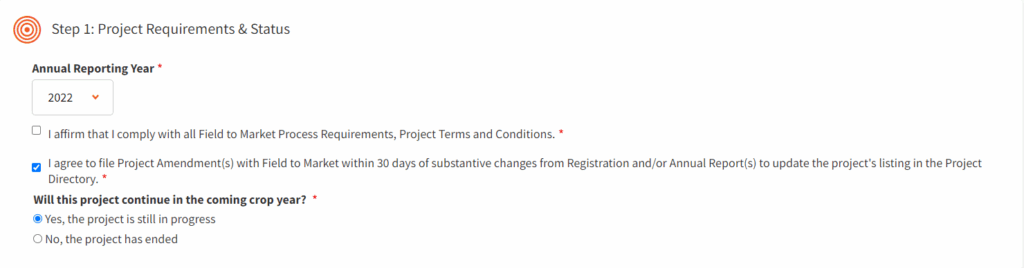
Project Requirements & Status
- Select your Annual Reporting Year. This is the previous year’s growing season. Example: Select 2023 for Annual Reports submitted by April 30, 2024.
- Check the boxes to affirm that you comply with Field to Market process requirements, project terms and conditions, and that you will file Project Amendments if substantive changes from the Registration or past Annual Reports are reported.
- Indicate if the project will continue for the upcoming crop year.
- If it will not continue, please describe why the project is ending. This Annual Report submission will act as the Project Evaluation.
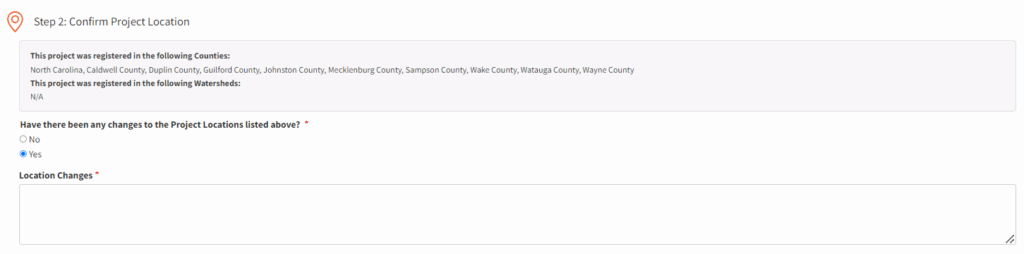
Confirm Project Location
- Confirm that the project location details are still correct from project registration or update the text box with new project location details.
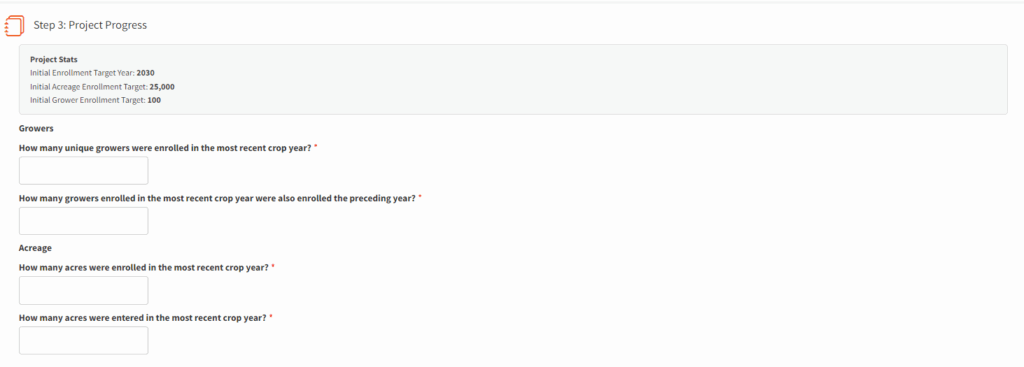
Report on Project Progress
- Provide information on:
- The number of new growers enrolled in the most recent crop year;
- The number of growers enrolled in the most recent crop year that were also enrolled in the preceding year (retained growers); and
- The number of entered (acres reported by the farmer in the Fieldprint Platform or with a Qualified Data Management Partner (QDMP)) and enrolled (acres managed by farmer for a particular crop) acres. Note: Projects require each grower to enter data for a minimum of 10% of their acres into the Fieldprint Calculator or with a QDMP to be enrolled in the Project for a specific crop. Also note: PCSC Program projects will have additional questions to determine the number of growers and acres that should be assigned for the PCSC actions vs Fieldprint Project.
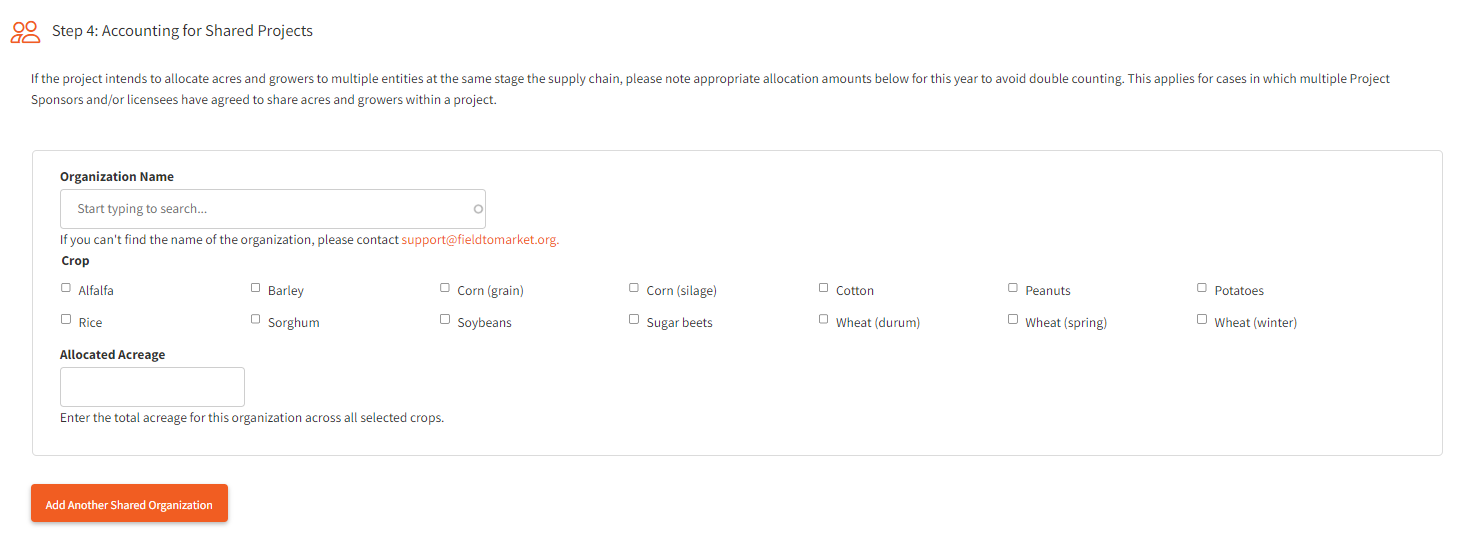
Accounting for Shared Projects
- If the project intends to allocate acres and growers to multiple entities at the same stage the supply chain, please note appropriate allocation amounts to avoid double counting. This applies for cases in which multiple Project Leads and/or licensees have agreed to share acres and growers within a project. Please note licensing fees may apply to acres allotted to organizations that are associate or non-members of Field to Market.
- Type the Organization Name for the partner organization.
- Select the crops.
- Enter the total acreage for this organization for the selected crops.
- Repeat the steps as needed to ensure all partner acres are accounted for.
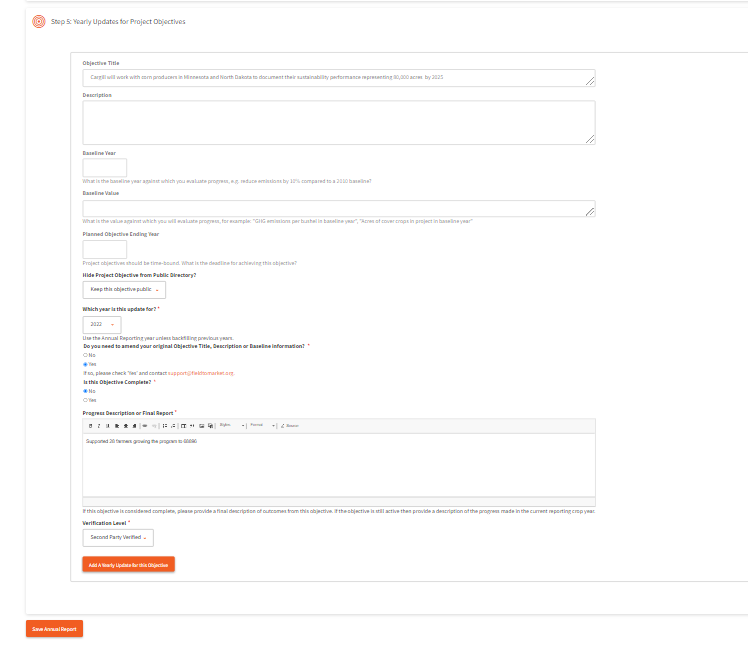
Yearly Updates for Project Objectives
- Review the Objective Title, Description, Baseline Year, Baseline Value, Planned Objective Ending Year, and Display options for the Public Directory for each Project Objective.
- Click Add ‘A Yearly Update for this Objective.’
- Select the year in which the update is for.
- Indicate if you need to amend your original Objective Title, Description, or Baseline Information. If yes, please email support@fieldtomarket.org.
- Indicate if the Objective is complete.
- Write a statement describing the progress made towards the Objective. If the objective has been met, please state this and share any lessons learned.
- Indicate verification level.
- First Party – These are Projects where the assessment of progress is performed by the person or organization that is being assessed for progress. Examples include self-assessments, internal audits, or a Project’s growers entering data directly into the Fieldprint Platform without technical assistance.
- Second Party – These are Projects where the assessment of progress is performed by a contracted party which has a user interest in the outcome of the assessment. In the context of Field to Market’s approach, this can be a contracted technical service provider, contracted Qualified Data Management Partner, NGO Project Administrator or other entity that is being contracted and paid by a Project Lead to manage a project.
- Third Party – These are Projects for which the assessment of progress is performed by an entity that is independent and free from conflicts of interest, having no vested interest in the outcome of the reported results. In the context of Field to Market’s approach, this would include letters of audit findings issued by an independent party. Field to Market only requires third-party verification for Projects that file Impact Claims, but Projects may also opt for third-party verification to cover the risk associated with other types of claims.
- Update each objective for the project.
Submit the Annual Report
- Click Submit Annual Report button.
If you need to make a change to your Annual Report after submission, please contact the Sustainability Projects Manager or email support@fieldtomarket.org. The Sustainability Projects Manager will review all Annual Report Submissions and may reach out to Project Administrators with questions.