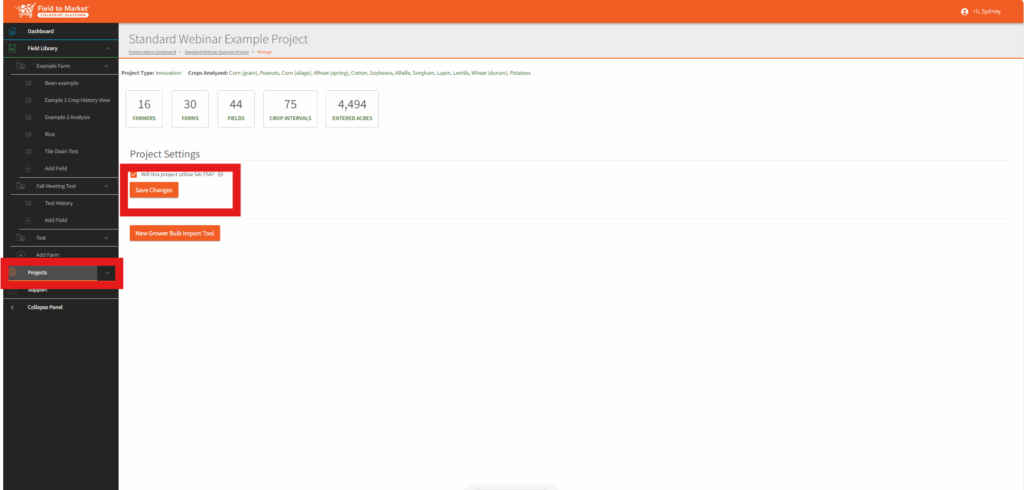
Enabling FSA for a Fieldprint Project
The FSA Equivalency Module is configured at the project level by a project administrator. Before a grower sees the 22-question survey on their farm, the project admin must:
- Open the project settings for the Fieldprint Project that will report FSA performance.
- Enable the SAI FSA Equivalency option for the project. This turns on the 22-question survey for every grower enrolled in that project for the reporting year.
- Confirm that each participating grower has at least one field with a crop interval finalized for the reporting year, and that at least one of those crop intervals is associated with the project. Without a finalized interval tied to the project, the survey cannot be submitted.
- Communicate to growers that the questionnaire is part of participating in the project and share the grower-facing article (Completing the SAI FSA Questionnaire) so they know where to find it and what to expect.
Prerequisites (from the Fieldprint Platform API)
- The grower has at least one field with one crop interval finalized for the year in which the survey is being requested.
- At least one of those crop intervals is associated with the registered Fieldprint Project for which the survey is being requested.